Remove Windows Messenger from Outlook Express
By default media player will show all recent played files. You can disable this as sometimes you do not wish other people to know what you have been viewing or listening to.
First, before editing your registry remember to always back it up first, just incase you do something wrong. The registry when modified is an instant change and cannot be undone.
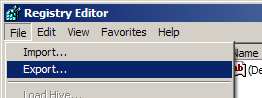
BACK UP REGISTRY: So to open the registry editor click on "START", "RUN", then type "REGEDIT" (No speech marks). The registry editor will now open, click on "FILE" then "EXPORT". From the save window that appear type in a file name (ie regback.reg), now click on "SAVE". Your registry has now been backed up.
TO DISABLE RECENT FILES: Now on the left hand panel click on "HKEY_LOCAL_MACHINE" , "Software", "Microsoft", then "Outlook Express" Next search for "Hide Messenger" in the right hand panel. If it is not present then simply create it by doing the following:
Right click on "Outlook Express" select "NEW" then left click on "DWORD". Name the new string value in right hand panel as "Outlook Express".
Now to set the value, double click on the string value and set it's value to "2" for remove messenger.
Disclaimer: This information is provided as is and we cannot guarantee that editing the registry will not cause serious damage. You use this information at your own risk.
